This tips do not work anymore, I wrote this post in 2017.
Does your bank give reward points in PAYBACK !! If yes, here’s something useful for you.
I’m sure in this period of demonetisation, you will be getting more reward points and you wish to convert it back into money. To know how, read this post.
No need to struggle buying stuff from payback website and waiting for points to increase. With Mobikwik, you can convert the points into eCash.
What is Mobikwik
Mobikwik is a mobile wallet service which you can use to pay for your Recharge, Bill Payments, Online Shopping, Purchases, and Instant Money Transfers.
For those who haven’t heard of it yet, it’s a wallet like Paytm and Freecharge. In last two years it has built reputation in the market. They do come up with good offers on shopping and recharges once in a while.
Links
Website URL : www.mobikwik.com
Download Android App here
play.google.com/store/apps/mobikwik
Download iOS App here
itunes.apple.com/in/app/mobikwik
If you are not able to find any referral, please feel free to use my referral link
Steps to convert payback points into Mobikwik cash
First you need to create an account on Mobikwik. Go to My Wallet > Redeem on website/app.
On this page you will see Payback card option. You can click on ADD CARD and submit you payback details for the payback account on which you have reward points. Submit the OTP and your Mobikwik and provided Payback account will sync.
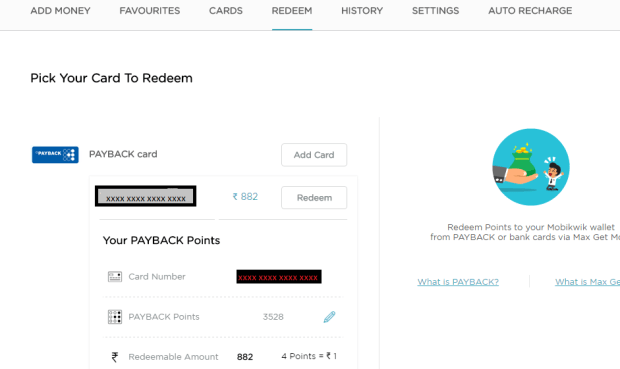
After this you can click on the redeem button. Let me tell you 4 points value equal to 1 Rupee. So it will show round off value like 3528/4 gives 882 rupees. Now you just have to put your payback pin and done. You will get the final amount in your Mobicash. You may later transfer it to bank for 4% service charges. But I would suggest to use Mobicash to pay for recharge, food and shopping. Almost all online retailers accept Mobikwik and you may get awesome offers at offline stores like central shop too.
Note: When you redeem points , payback charges 25 rupees service charge for each such transaction. So you may wait until you have more than 1200 points because they have set a monthly limit of redeeming upto 300 rs.
If you like my work, please follow and share it with your friends. It means a lot to me, as I am beginner and need everyone’s support. Checkout my social media handles –
Instagram – Pretty Smart Techie
Facebook – Pretty Smart Techie
Twitter – Pretty Smart Techie
YouTube – Pretty Smart Techie
Disclaimer : This post is not sponsored.


I can’t redeem whole amount. Its saying that I cannot redeem more than Rs. 100 worth.
LikeLike
I am not getting the option to add a new card. Can you plz help. Contact me on ritanshuparmar@gmail.com
LikeLike
Helpful
Specially reward point calculation into cash value
And charges ICICI Bank levy on reward points redemption
LikeLike